Protocol import (USDM)
The protocol-first build path derives a study build from a CDISC USDM v4 protocol package instead of hand-built forms. If you are new to structured protocols, read Why protocol-first? first; this page is the how-to.
What the importer accepts
A USDM v4 JSON package: the API “wrapper” format defined by the CDISC DDF reference architecture, a top-level object with usdmVersion and a study containing one StudyVersion, which holds the study design (encounters, activities, schedule timeline) and the biomedical concepts. The repository ships a complete worked example in examples/demo-protocol-usdm.json.
On upload, edc-core:
- validates the package (shape, cross-references, one main timeline);
- stores it as an immutable protocol version (append-only, like study builds);
- compiles a candidate build: encounters → events, scheduled activities → forms, biomedical concepts → items and codelists;
- opens the review screen: the protocol’s schedule of activities with a resolution status for every concept.
Nothing is published yet at this point. The candidate is a workspace.
The review screen
Columns are the protocol’s encounters (with planned timing and visit windows straight from the protocol); rows are its activities. Each activity lists its biomedical concepts:
- Green (resolved): the concept mapped to concrete collection items (variables, datatypes, codelists), constrained by what the protocol enables and requires.
- Amber (draft): the protocol names the concept without enough definition to build fields (a surrogate concept), or the bundled mapping doesn’t carry it. Click the badge to complete it: name the item, set the question text, datatype, and optional codelist.
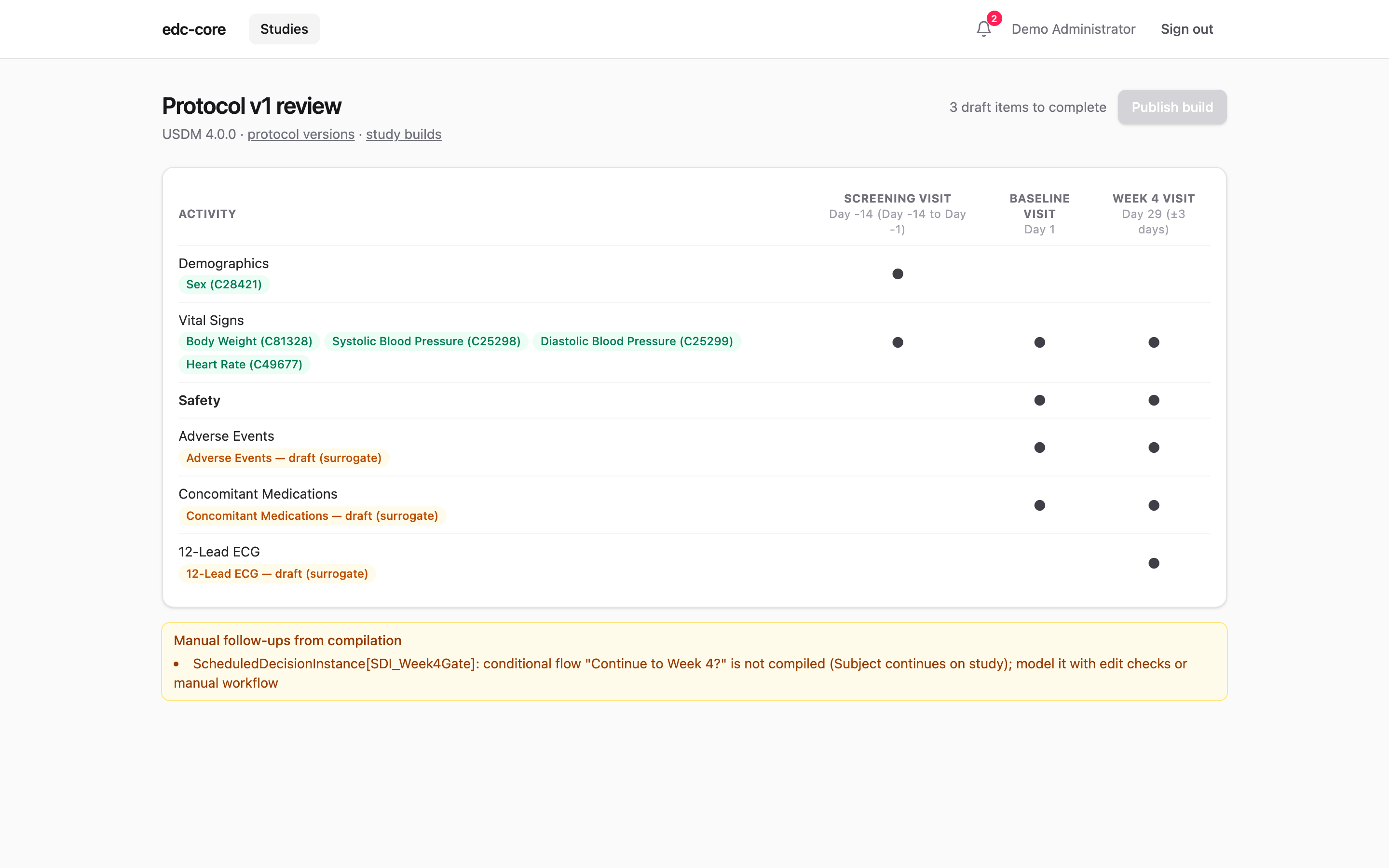
Publish build stays disabled until every draft is completed, so a published build is always capture-ready. Publishing creates a normal study build (the same versioned store as ODM imports and the visual builder), records field-level traceability back to the protocol, and takes you to the builder, where the build can be refined like any other: edit checks, blinding flags, coding dictionaries, extra forms.
Compilation notes appear under the matrix. Review them: conditional schedule logic (e.g. “continue to Week 4?” decision points) is not compiled into forms and should be modeled with edit checks or workflow instead, and activities with no data specification produce empty forms.
Amendments
Import the amended protocol as a new protocol version: it compiles to a new candidate, review works the same way, and publishing creates the next build version. From there the standard amendment tooling applies: diff the builds, analyze the migration, and move in-flight subjects.
Traceability
For protocol-derived builds, every event, form, item, and codelist records which protocol element it came from, visible in the ODM export as edc: attributes and queryable via GET /studies/:id/metadata-versions/:version/traceability. Auditors get a direct answer to “where did this field come from,” and data managers can ask “which fields carry biomedical concept X” without opening the build.