Lab data import
Central labs deliver results as batch files. Instead of keying them in, users with the data.import permission (data managers and admins by default) upload the file, review a dry-run report, and execute. The values land on ordinary eCRF forms through the same audited write path as typed data. That one design decision does most of the work: the audit trail, edit checks, blinding, SDV, signatures, casebooks, and the analytics lake all treat imported values exactly like entered ones.
End to end, a transfer looks like this: the lab emails (or drops) a CSV; the data manager opens the study page’s Lab data import panel, picks the mapping for that lab, chooses the file, and clicks Validate. The dry-run report says exactly what would happen, per row, before anything is written:
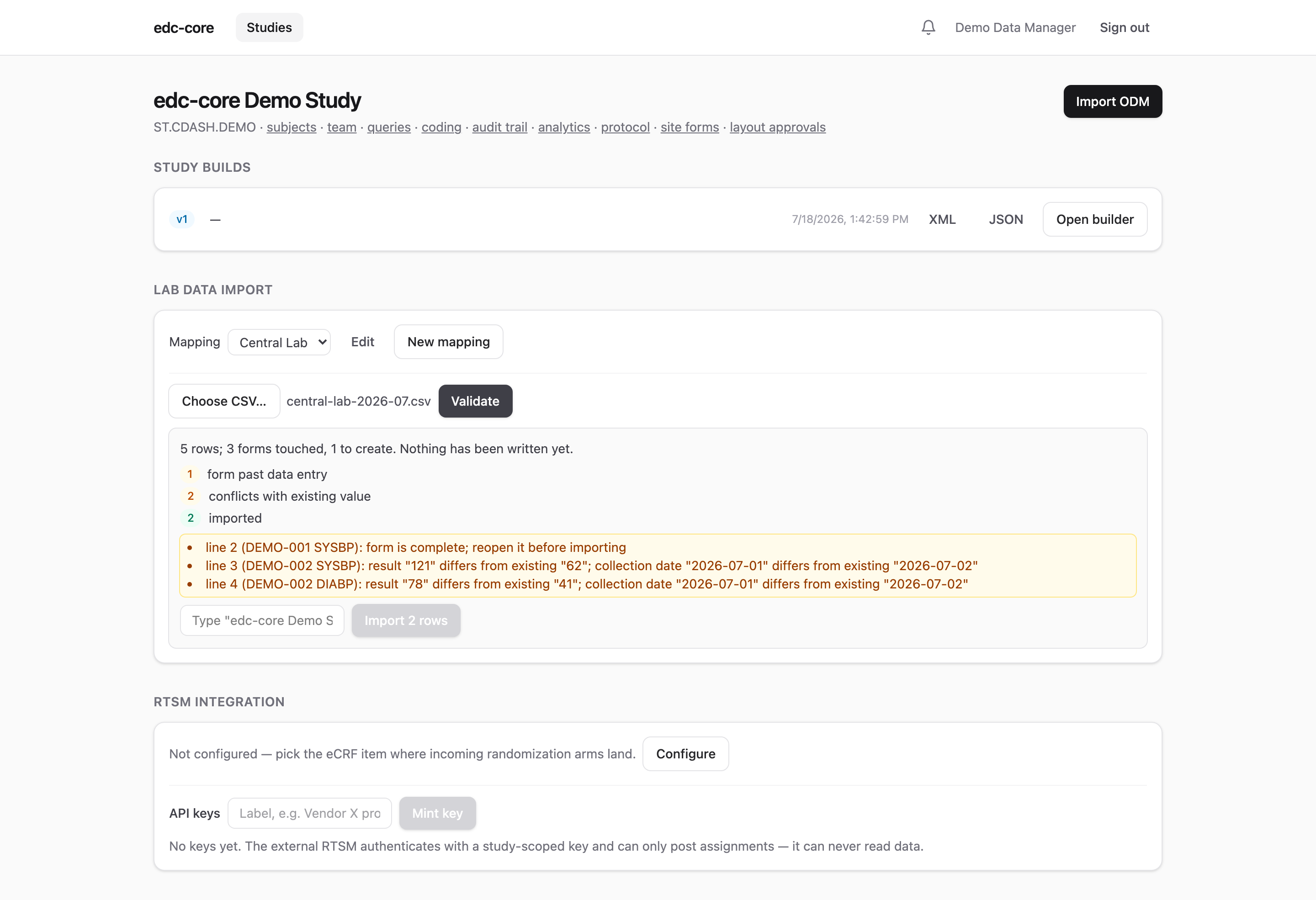
If the report looks right, typing the study name confirms the import, which runs in the background with a final row-by-row report. The rest of this page is the reference for each piece.
File format
A CSV file in tall format: a header row, then one row per test result. RFC 4180 quoting is supported (embedded commas, quotes, and newlines), the delimiter is a comma, and files up to 10 MB (roughly a hundred thousand rows) are accepted. Malformed files (ragged rows, unterminated quotes) are rejected whole.
Column names are whatever your lab sends; the mapping (below) tells edc-core what they mean. The examples here use SDTM-style names (USUBJID, VISIT, LBTESTCD, LBORRES, LBORRESU, LBDTC) because labs and data managers tend to recognize them. That is a naming convention borrowed for familiarity, not a claim of SDTM conformance; the importer neither requires nor produces SDTM datasets.
USUBJID,SITEID,VISIT,LBTESTCD,LBORRES,LBORRESU,LBDTC
S-001,SITE.A,SCREENING,ALT,42.5,U/L,2026-07-01
S-001,SITE.A,SCREENING,HGB,13.2,g/dL,2026-07-01
Mappings
A mapping is a named, per-study configuration connecting the lab’s file layout to the study build: which columns identify the subject, visit and test, which visit labels correspond to which event OIDs, and where each test code’s result lands. Mappings are created and edited in the study page’s Lab data import panel (JSON, with a template provided), and every change is recorded in the audit trail with the full before and after configuration.
{
  "formOid": "FO.LAB",
  "columns": {
    "subjectKey": "USUBJID",
    "siteOid": "SITEID",
    "visit": "VISIT",
    "testCode": "LBTESTCD",
    "result": "LBORRES",
    "unit": "LBORRESU",
    "collectionDate": "LBDTC"
  },
  "visitMap": { "SCREENING": "SE.SCR", "WEEK 4": "SE.W4" },
  "tests": {
    "ALT": { "itemGroupOid": "IG.LAB", "itemOid": "IT.ALT", "unitItemOid": "IT.ALTU" },
    "HGB": { "itemGroupOid": "IG.LAB", "itemOid": "IT.HGB" }
  },
  "collectionDateItem": { "itemGroupOid": "IG.LAB", "itemOid": "IT.LBDT" }
}columns.subjectKey,visit,testCode, andresultare required; the rest are optional.siteOid, when configured, cross-checks the file’s site against the subject’s enrolled site; mismatches are errors, not silent accepts.visitMapmatches the visit column case-insensitively.- A test’s
unitItemOidreceives the unit column’s value; tests without one simply ignore the unit. There is no unit conversion; the file’s values are stored as sent. collectionDateItemreceives the collection date once per form.
OIDs are checked against the study’s latest build when a file is validated, not when the mapping is saved: builds move, and a stale mapping should fail loudly at import time.
Validate, then execute
Every import is two steps. Validate parses and classifies the whole file without writing anything: how many rows would import, which would be skipped and why, which forms would be created. Execute re-validates and runs the import in the background with live progress; the final report counts every row by outcome and lists issues (downloadable as CSV).
The import contract:
- Missing form instances are created. Central labs usually report before the site opens the form, so the importer instantiates the event and form exactly as data entry would, with audit rows.
- Imports never overwrite. A row whose value already exists identically is skipped, so re-sending a cumulative file is safe and idempotent. A row that differs from the stored value is reported as a conflict and left untouched; corrections go through the normal entry workflow, with a reason for change.
- Forms past data entry are skipped. Complete, verified, signed, and locked forms never accept imported values; reopen them first if the lab retransmission is real.
- Withdrawn and screen-failed subjects are skipped. Their rows are reported (
skipped_subject_status), never written silently; reinstate the subject first if the disposition is wrong. Completed subjects still import: post-completion results are a routine data flow. - Blinded items require
data.unblind. A row targeting a blinded item is skipped unless the importing user could also see that value, the same rule as manual entry. - Edit checks run. An imported out-of-range value opens a system query exactly as a typed one would.
In the audit trail, imported values carry the action item_value.imported (rather than item_value.entered), so data origin is permanently distinguishable, and each run writes lab_import.started / lab_import.completed events with its outcome counts.
Current limitations
- One result per subject, visit, and test: repeating events and repeating item groups are not yet addressable (repeat keys are fixed at 1).
- No unit conversion; the unit is stored verbatim.
- If a form is still pinned to an older build that lacks a mapped item, its rows are skipped with a message; run the amendment migration first.
- Mappings cannot be deleted (runs reference them); rename retired ones.