Medical coding
Sites report adverse events and medications in their own words: “stomach ake”, “asprin 81mg”. Analysis needs standardized terms: regulatory datasets pair each verbatim with its dictionary-derived equivalent (in SDTM, AETERM codes to AEDECOD, the MedDRA Preferred Term, with AELLT/AEBODSYS/AESOC carrying the rest of the hierarchy; CMTRT codes to CMDECOD, the generic drug name in WHODrug, with ATC classes in CMCLAS). Sites are not expected to be coding experts. Coding is a data-management activity that happens after entry, and edc-core gives it its own audited workflow.
Bring your own licensed dictionary
MedDRA is licensed by the MSSO and WHODrug by the Uppsala Monitoring Centre; edc-core ships no dictionary content and does not parse their native distribution formats. Instead, convert your licensed distribution once into a flat CSV (a simple join your distribution tooling produces directly) and load it:
MedDRA: one row per Lowest Level Term, carrying its primary-SOC hierarchy path:
llt_code,llt_term,pt_code,pt_term,hlt_code,hlt_term,hlgt_code,hlgt_term,soc_code,soc_termWHODrug: one row per drug name; ATC columns may be empty:
code,name,atc_code,atc_textSynthetic examples of both layouts live in examples/dictionaries/ (made-up codes; not MedDRA or WHODrug content).
System administrators load dictionaries at Studies → Dictionaries (up to 50 MB per upload) or with the CLI for very large files:
pnpm --filter @edc-core/api db:load-dictionary -- \
  --type MedDRA --version 27.1 --file meddra-27.1.csv
Loads are validated whole: a malformed row, empty required field, or duplicate code rejects the file with its line number. A loaded dictionary is immutable; a new release is a new upload with a new version label. Dictionaries are global: load MedDRA 27.1 once and every study can bind to it.
Binding a study
On the study’s coding page, anyone with study.manage binds the study to one dictionary per type. Every coding stamps the dictionary version it used, so rebinding mid-study never rewrites history; the codings made against 27.0 still say 27.0. (Regulatory datasets expect exactly that: the dictionary name and version used for coding is declared in Define-XML.)
Marking items for coding
The study build declares which items hold verbatim terms via the edc:CodingDictionary attribute (or the Coding select in the builder):
<ItemDef OID="IT.AE.AETERM" Name="Reported Term" DataType="text"
         edc:CodingDictionary="MedDRA"/>
<ItemDef OID="IT.CM.CMTRT" Name="Reported Medication Name" DataType="text"
         edc:CodingDictionary="WHODrug"/>
Like blinding, the flag is protocol metadata and versions with the build. Blinded items are never codable (coding surfaces show verbatims to every coder, which would bypass blinding), and the build importer warns if an item is flagged both ways.
The coding workflow
Coding needs the data.code permission (data managers and admins by default; grant it to a dedicated coder role via role management). Codings live in their own append-only table beside the clinical record, not in the form data:
- Coding never touches the form. A completed, signed, or locked form is codable without reopening it, without invalidating signatures, and without an entry in the form’s workflow history.
- Corrections append. Recoding or clearing writes the next version; the full history stays queryable and every action is in the audit trail (
coding.assigned,coding.cleared) with old and new values. - Each coding stamps the verbatim it coded. If a site later corrects the verbatim, the coding shows as stale on the coding page until a human confirms or recodes it.
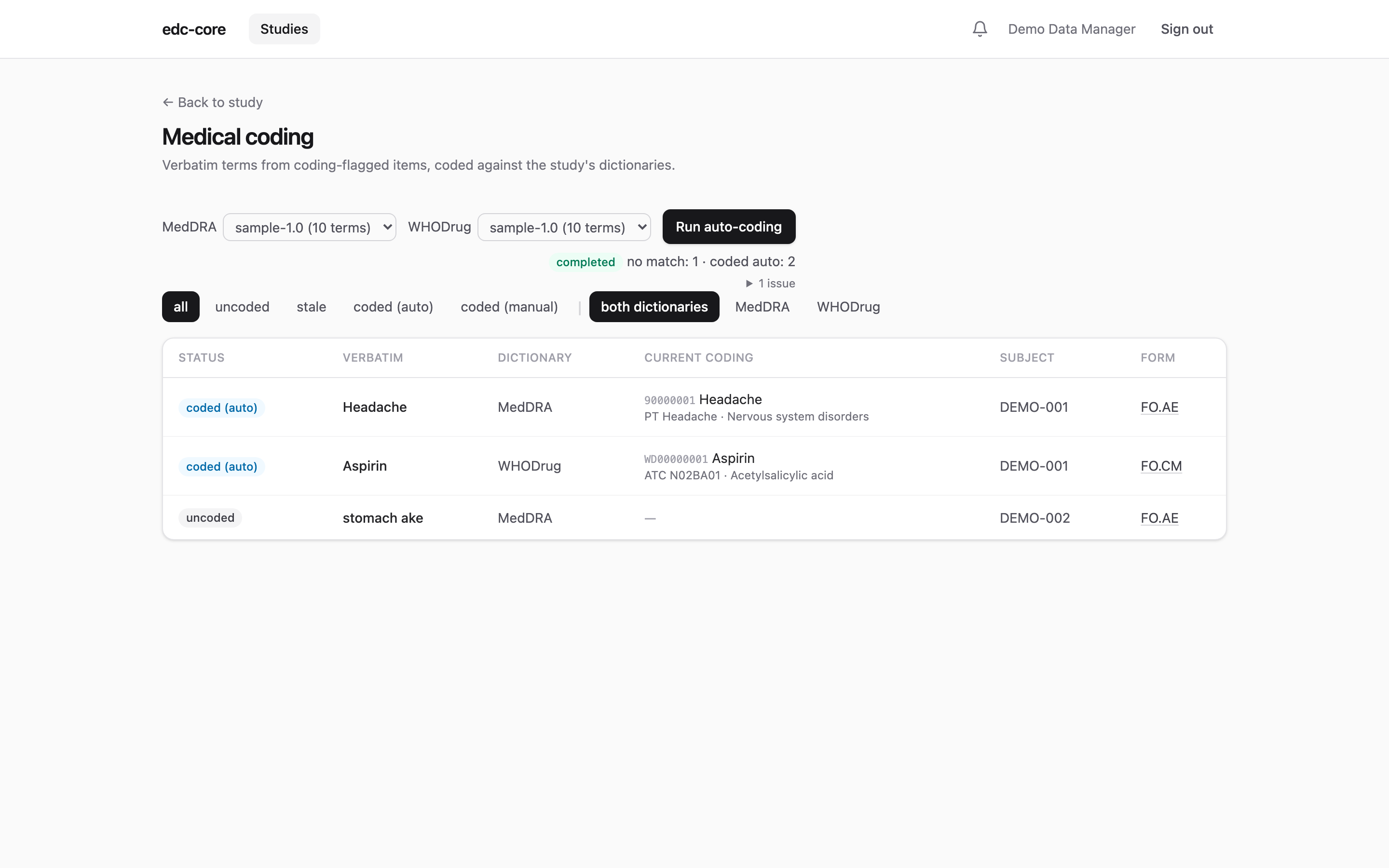
Auto-coding handles the bulk: one click starts a background run that assigns every uncoded verbatim exactly matching a dictionary term (case- and whitespace-insensitive; MedDRA matches LLT terms, WHODrug matches drug names). Everything else is reported (no match, ambiguous match, no dictionary bound), and the run never touches already-coded or stale occurrences. Auto-codings are audited with origin: auto and the run id, and can be overridden manually at any time.
Manual coding is the search-and-assign panel on each row of the coding page: search the bound dictionary (substring match, exact matches first), review the hierarchy path or ATC class, and assign.
Analytics
Every snapshot publish includes a codings lake table, the latest coding per occurrence with its full stamped path, joinable to any dataset on the occurrence keys:
SELECT ae.subject_key, ae.it_ae_aeterm, c.pt_term, c.soc_term
FROM lake.ig_ae ae
LEFT JOIN lake.codings c
  ON c.subject_key = ae.subject_key AND c.event_oid = ae.event_oid
 AND c.item_group_repeat_key = ae.item_group_repeat_key
 AND c.item_oid = 'IT.AE.AETERM'
One conformance note: regulatory submissions expect coded terms to match the dictionary’s exact case and spelling. edc-core stores the dictionary term verbatim from your converted CSV, so that property is inherited from your conversion: convert faithfully.
Current limitations
- No coding queries: a coder needing site clarification opens an ordinary manual query (requires
query.manage). - No coder/reviewer approval step; a coding is effective when assigned.
- Exact-match auto-coding only; no synonym lists or wildcard rules.
- No SMQ (Standardised MedDRA Queries) support.
- One coding per item occurrence; repeating item groups code each occurrence independently.