Exports, casebooks, and the study archive
Sooner or later the data has to leave: to biostatistics, to a submission, to a sponsor handover, to a records room that will outlive every vendor contract. edc-core’s exit paths are deliberately boring: open formats, pinned to immutable snapshots, downloadable by anyone with the right permission. This page covers the four of them: table exports, subject casebooks, the study archive, and automatic eTMF filing.
Who does this: snapshot publication, exports, casebooks, and archives require the export.data permission (demo-dm or demo-admin in the demo).
Snapshots are the export boundary
Everything exports from a snapshot, never from live capture tables. That is what makes an export defensible: a snapshot is an immutable, point-in-time dataset, so the file you sent to biostatistics in March re-reads identically in November, no matter how much capture happened in between. If you need fresher data, publish a fresh snapshot; the old one stays.
Table exports
On the workbench, every snapshot table card offers its download links:
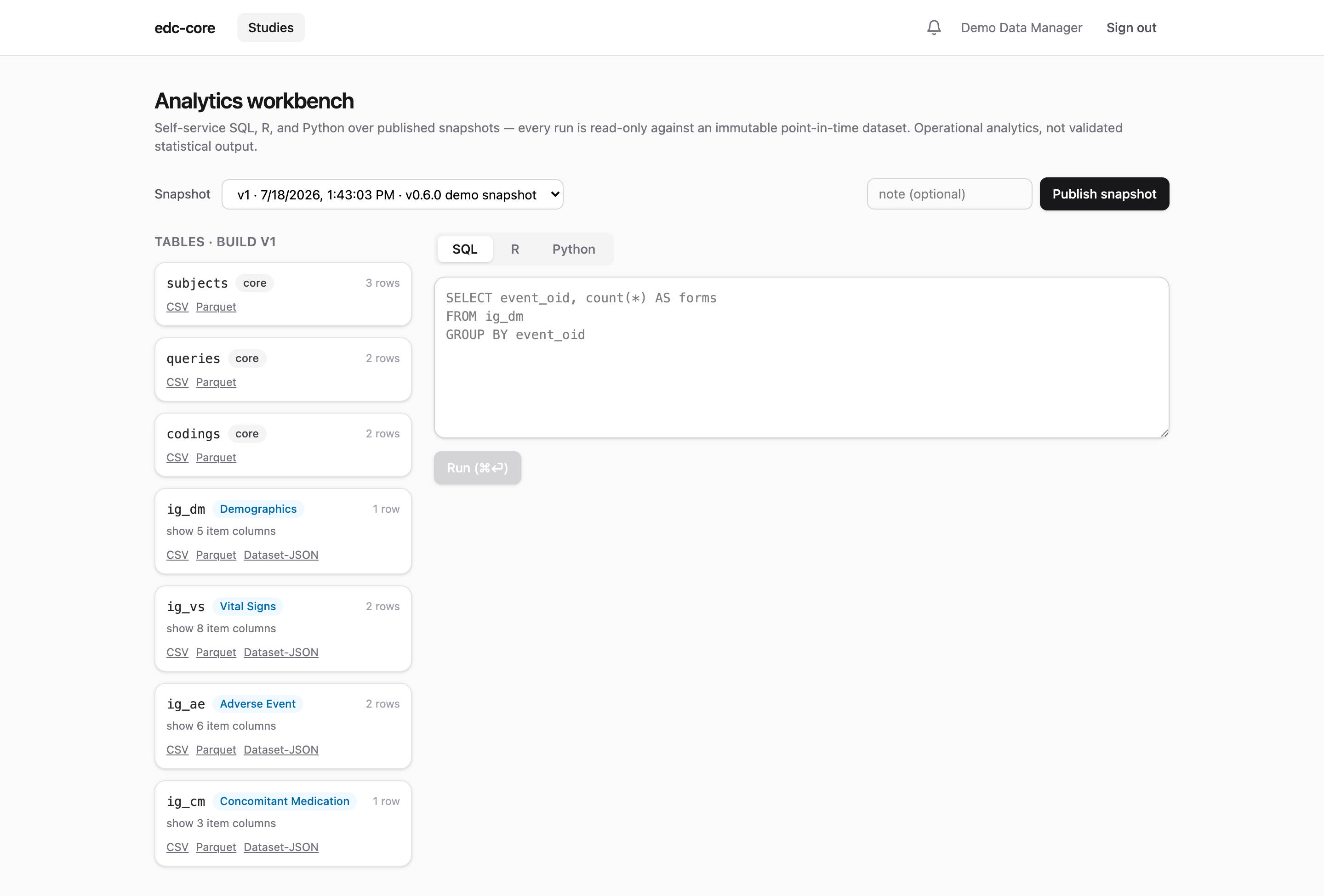
Three formats, three audiences:
- Dataset-JSON v1.1: the CDISC exchange standard accepted by FDA. Use it for anything regulatory-facing or moving between clinical systems; it carries dataset and variable metadata, not just values.
- CSV: for humans and spreadsheets. No metadata, universally readable.
- Parquet: for analysts. Typed, compressed, and loads directly into R, Python, or any modern analytics tool without parsing ambiguity.
Tables are one per ODM item group (ig_vs, ig_ae, …) plus subjects, queries, and codings, with repeating groups carried as item_group_repeat_key. Blinded items are absent from snapshots by construction, so every export is blinded without anyone remembering to mask a column.
The subject casebook
Every subject has a PDF casebook: a human-readable rendering of all their captured forms with current values, correction markers (version and reason for change), per-occurrence repeating groups, query threads, and the signature manifest. Blinded values print as [BLINDED] unless the requester can unblind.
Download it from the subject’s row on the matrix, or GET /subjects/:id/casebook. Casebooks answer the person-level question (“show me everything for subject DEMO-001, as a document”) the way table exports answer the variable-level one, and one is generated per subject in every study archive.
The study archive
The archive is the whole study as one self-contained zip, built to outlive the running system:
- the ODM study definition (XML and JSON) for every build version;
- all snapshot datasets, as Dataset-JSON and CSV;
- the complete audit trail as CSV;
- the signature manifest;
- a PDF casebook per subject;
MANIFEST.json, identifying the exact snapshot version archived.
Everything inside is an open format readable without edc-core, which is the point: retention obligations run long after any system is decommissioned. Retrieval and retention duties under ICH E6(R3) §4.2.7, and what remains procedural (the retention period itself, storage location, periodic retrieval checks), are covered in the data lifecycle page.
For CRO and sponsor leadership evaluating exit risk: this archive is the exit path. A study can be handed to a sponsor, a successor CRO, or a records archive as one bundle, with no residual dependency on the running deployment or on anyone’s goodwill.
Automatic eTMF filing
Deployments connected to an eTMF (the reference integration targets ctms-core, edc-core’s sibling on the regulatory-document side) file study-level artifacts automatically:
- importing a study build files the blank CRF, as ODM XML;
- publishing a snapshot files the snapshot manifest.
The boundary is deliberate: only study-level documents. Subject-level clinical data (casebooks, captured values) never leaves through this path; the eTMF holds documents about the trial while the EDC remains the system of record for data in the trial. Filing is best-effort and asynchronous: the triggering operation never waits on the eTMF or fails because of it, and each filed document lands in the eTMF as pending review with provenance naming the build or snapshot it came from. Configuration lives in docs/etmf-filing.md.
Permissions
export.data gates snapshot publication, table exports, casebooks, and archives. analytics.run gates the workbench itself, so an organization can let someone query without letting them take data out, or vice versa. Like all grants, both are per-study and audited.
Where next
- Analytics workbench: querying snapshots before exporting them.
- Blinding: why exports can’t leak blinded values.
- Data lifecycle: retention, destruction, and the procedural side.