Enrollment and milestones
Reporting enrollment
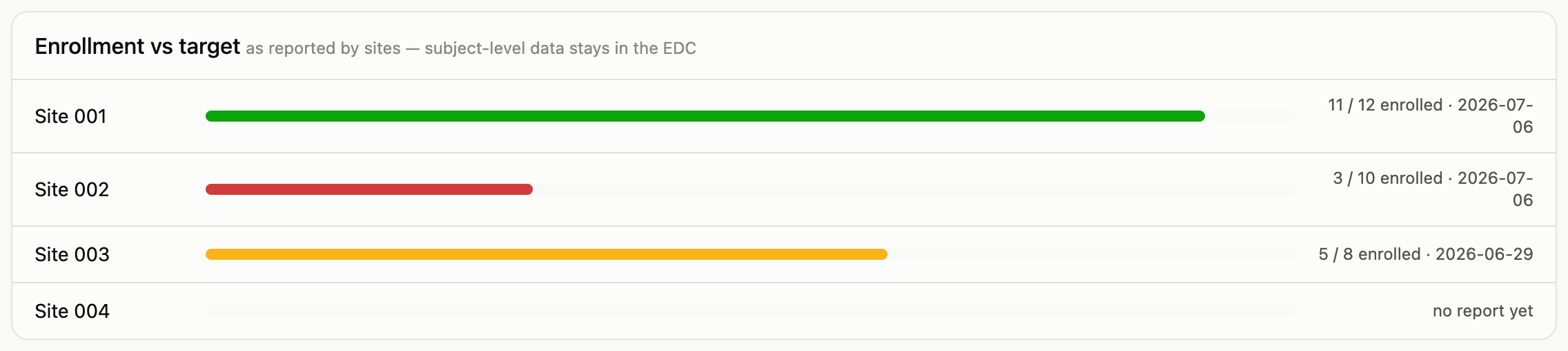
Sites report their own counts (screened, enrolled, withdrawn, completed) on their site page, dated as of today. The dashboard’s enrollment card shows each site’s latest report against its target.
Two things worth knowing:
- These are aggregates only. Counts, not people. Subject-level data lives in the EDC and never enters this system; that’s a deliberate boundary, not a missing feature.
- Corrections are safe. If a count was wrong, report the corrected numbers. The change is recorded in the audit trail with the before and after values, so a correction never silently overwrites history.
Milestones
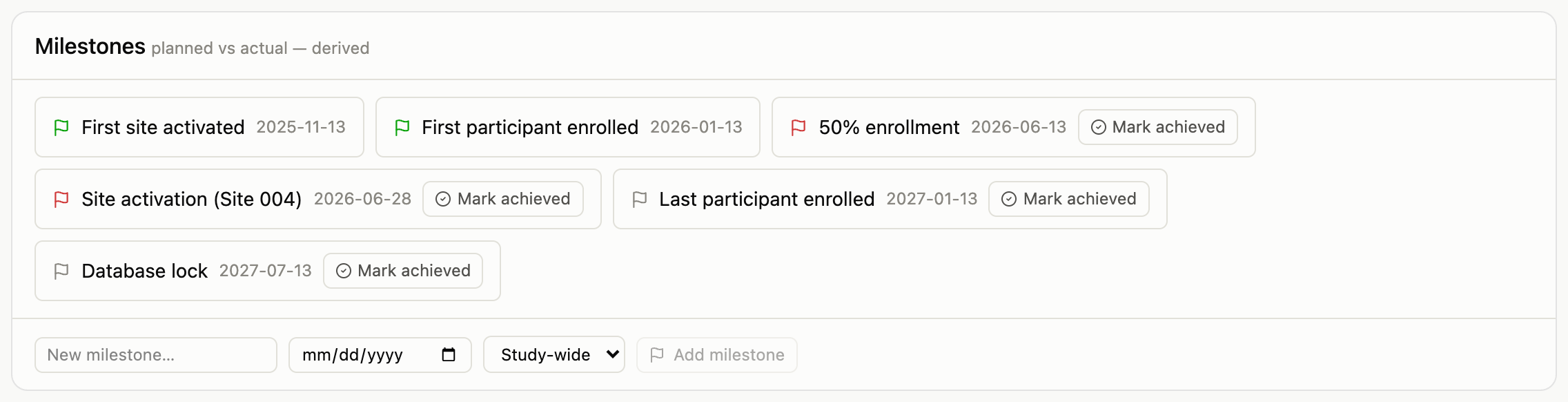
Milestones track the study’s key dates (first site activated, 50% enrollment, database lock) as planned versus actual. Green is achieved, red means the planned date has passed, grey is upcoming. Nothing here is a countdown anyone maintains: the moment a planned date passes unachieved, the chip turns red on its own.
Both actions live on the dashboard’s milestones card:
- Add a milestone with a name, a planned date, and a scope: study-wide, or tied to one site (a site activation, for example).
- Mark achieved on any unachieved milestone stamps today as the actual date.
Like every change in the system, both are audited automatically.