Getting started
ctms-core runs locally with Node and Docker. The whole stack (Postgres, REST API, and web dashboard) comes up in a few minutes with a seeded demo study. Standing it up is a developer task; once it’s running, the user guide covers everything from there without code.
Try it with zero install

The badge boots the seeded stack in a free GitHub Codespace. No local tools needed, just a GitHub account. After about 3 minutes the dashboard opens on the forwarded port; the dev bearer tokens below work immediately, and the codespace (fictional data only) is yours alone to delete when done.
Prerequisites
- Node 22+ and pnpm
- Docker (for Postgres 16)
Run it
cp .env.example .env
pnpm install
pnpm db:up        # Docker: Postgres 16 (:5433), MinIO, mailpit (SMTP :1025, UI :8025)
pnpm db:migrate
pnpm db:seed      # demo study: 4 sites, 12 staff, realistic gaps
pnpm dev          # API on :8787, web on :5173
Then open, on the machine running the stack:
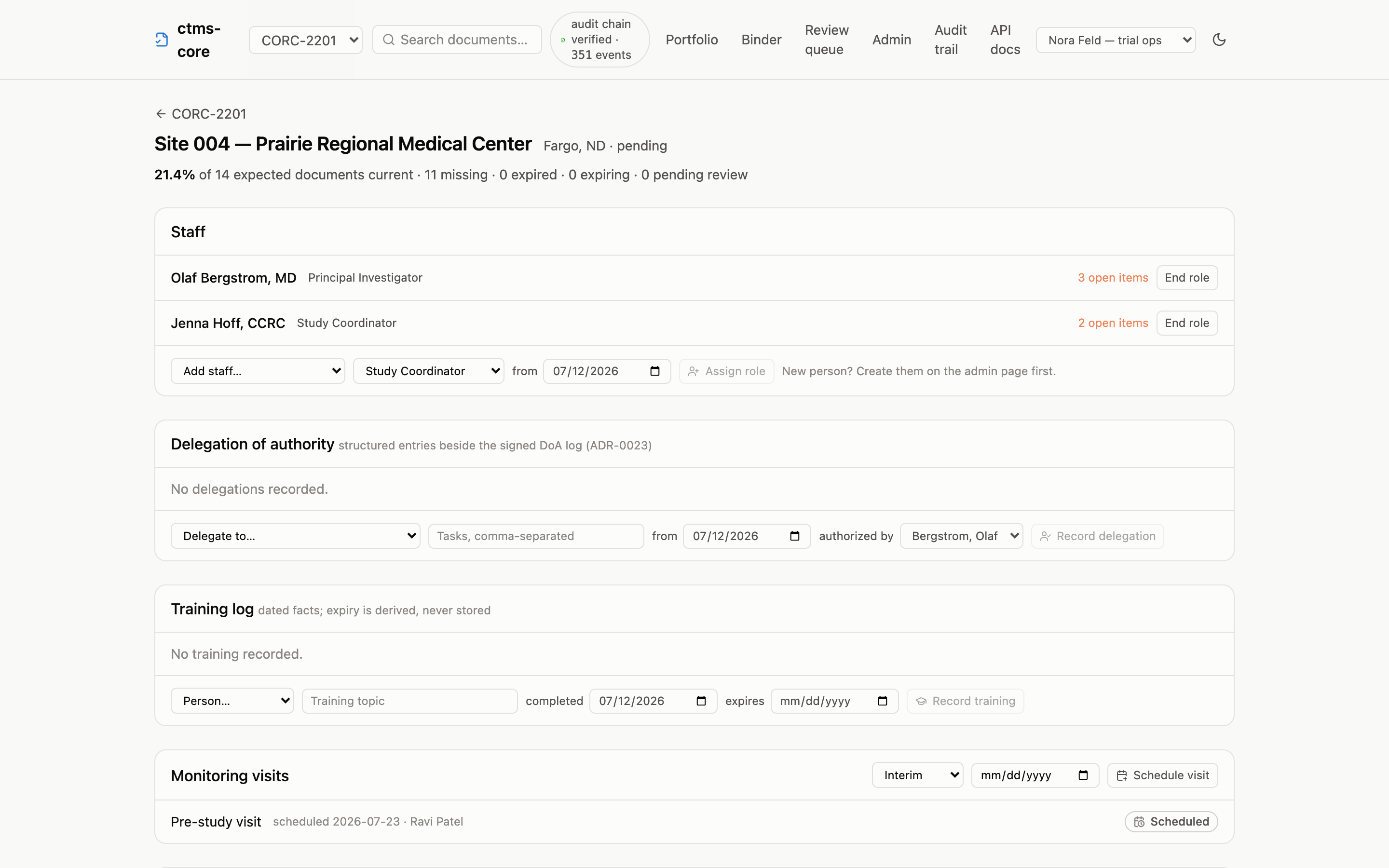
http://localhost:5173, the dashboard: completeness grid, site detail, visit lifecycle, audit timelineshttp://localhost:8787/docs, the interactive API reference, generated from the OpenAPI 3.1 spec at/openapi.json
Want the morning-email view? Uncomment SMTP_URL in .env and run pnpm digest. The oversight digest for the demo study lands in mailpit at http://localhost:8025.
What the seed gives you
Two studies. CORC-2201 is a four-site Phase 2 oncology study with twelve staff across PI, sub-investigator, coordinator, pharmacist, and research nurse roles; requirement rules for the usual site- and person-scoped essentials; and deliberately realistic gaps (a missing IRB approval here, a GCP certificate expiring soon there) so the completeness views have something to say. CORC-2202 is a smaller Phase 1b in startup, sharing two of the same physical sites, so the study switcher and the portfolio page have a real contrast. The TMF taxonomy is an illustrative ~40-artifact subset of the CDISC TMF Reference Model, using official artifact numbers (see the data model).
The seed also creates a read-only SQL role (ctms_readonly) so you can point R or Python straight at the database; see direct SQL access.
Your first query
Five dev bearer tokens map to seeded people: dev-admin-token (admin grant), dev-monitor-token (monitor grant: can read, upload, and sign, but not approve or administer), dev-service-token (the EDC filing machine identity: read and upload only, see ADR-0011), dev-site-token (the site 001 coordinator’s site-scoped seat, see ADR-0023), and dev-auditor-token (the auditor’s read-everything, change-nothing seat, see ADR-0028). Every request needs one. This is the demo’s AUTH_MODE=dev; a pilot runs AUTH_MODE=oidc against a real identity provider instead (see .env.example).
curl -s http://localhost:8787/studies \
-H "Authorization: Bearer dev-monitor-token" | jqlibrary(httr2)
request("http://localhost:8787/studies") |>
req_auth_bearer_token("dev-monitor-token") |>
req_perform() |>
resp_body_json(simplifyVector = TRUE)import httpx
httpx.get(
"http://localhost:8787/studies",
headers={"Authorization": "Bearer dev-monitor-token"},
).json()From there, the cookbook builds up the queries this system exists for: expected-vs-actual across every site, expiring credentials, visit lifecycles, and the audit chain.
Tests and resets
pnpm test                   # includes DB-level audit-immutability + WORM tests
pnpm validation:iq          # installation qualification against the live env
pnpm validation:artifacts   # OQ report + requirement traceability matrix
Re-running pnpm db:seed resets the demo data. Two things to know:
- Seeding regenerates person UUIDs, so don’t cache ids across reseeds.
- The blob store for uploaded files defaults to a local
storage/directory, content-addressed by sha256 (STORAGE_DRIVER=local); thes3driver adds Object Lock WORM for a pilot (see.env.example).
Deploying a pilot
The dev stack above is not a deployment. For a real host, tagged releases publish container images to GHCR (ghcr.io/tgerke/ctms-core-api, ghcr.io/tgerke/ctms-core-web), and infra/compose.prod.yaml runs them behind automatic TLS with the least-privilege wiring built in: copy infra/.env.example, set a domain, passwords, and your identity provider, and docker compose -f infra/compose.prod.yaml up -d. If the VM doesn’t exist yet, infra/cloud-init.yaml provisions it unattended on any provider that accepts cloud-init user data. The full pilot checklist (IdP registration, Object Lock, backups, validation sign-off) is docs/05-deployment.md. Never run pnpm db:seed against a deployment; it truncates everything.
Installing ctms-core alongside its sibling edc-core on one host, with a shared Keycloak for single sign-on and the EDC-to-TMF filing credential pre-wired? That topology is packaged separately as clinical-stack.