ctms-core
The expected-vs-actual document state of a clinical trial should be a query, not a monitoring visit.
The problem
Clinical trial regulatory documents live in eBinder, eISF, and eTMF systems that are, structurally, compliant document buckets: folders of PDFs with metadata tags. They satisfy 21 CFR Part 11 and ICH GCP, which is why organizations buy them. But the questions a sponsor- or CRO-side team actually asks are relational:
- Which people at which sites have completed which documents?
- What is expected but missing, at every site, right now?
- Whose credentials (CV, medical license, GCP training) expire in the next 60 days?
- Which sites still lack IRB approval for protocol amendment 3?
In incumbent systems these get answered by coordinators clicking through folders, by monitoring visits, or by exported spreadsheets. The APIs are afterthoughts: flat, folder-oriented, and frustrating for a data-science team.
What ctms-core is
ctms-core is a regulatory-document backbone built for the sponsor/CRO oversight seat: the team watching many sites at once.
These docs serve two audiences. If you coordinate or monitor studies, start with the user guide, which covers every task point and click, no code. If you script against the API or query the database, start with the cookbook. The rest of this page is the design argument, which you can skip.
Three design commitments define the system:
A real relational core. Documents are rows, typed by the CDISC TMF Reference Model taxonomy and scoped to a study, a study-site, or a person, with immutable content-addressed versions. Studies, sites, people, and role assignments are first-class entities, not folder names.
A requirement engine. Declarative rules (“every active site needs a current IRB approval per protocol version”; “every investigator needs a CV no older than 2 years”) materialize expected documents. Completeness status (missing, pending review, current, expiring soon, expired, superseded) is derived by database views, never hand-maintained. It cannot drift from the documents themselves, because it is computed from them on every read.
Compliance as schema, not as feature. The Part 11 primitives are properties of the database: an append-only, hash-chained audit trail written by triggers on every mutation; document versions that cannot be updated or deleted; signatures cryptographically bound to the content hash they signed. An auditor’s question (“show me everything that happened to this record”) is also just a query.
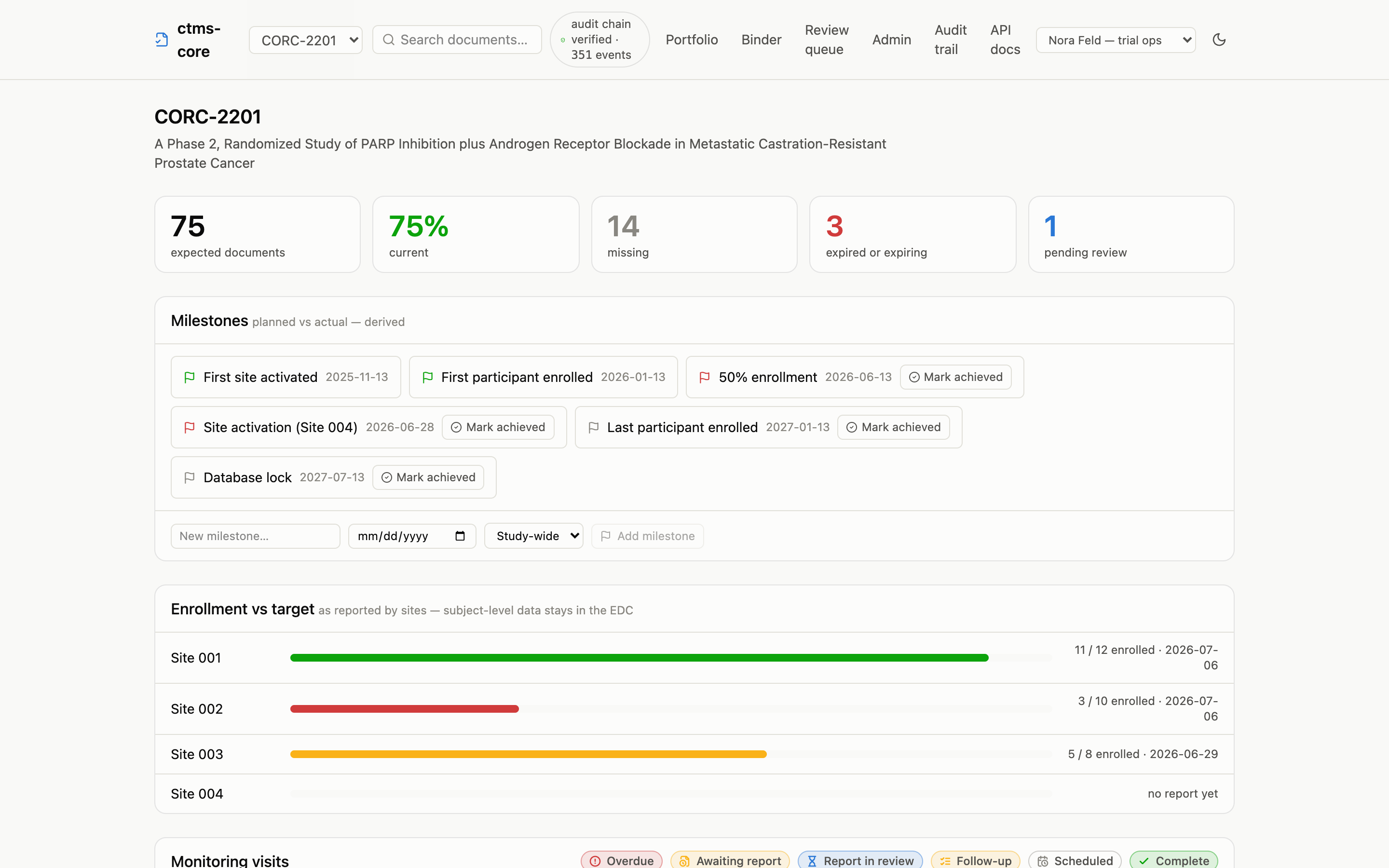
The same pattern extends to trial operations: monitoring visits, protocol deviations, enrollment reporting, and milestones are dated facts in tables, with lifecycle stages (overdue, awaiting report, resolved, achieved) derived by views. See the operational layer guide.
The day-to-day surface is built over those same views, not beside them. Header search reads document content as well as metadata. The review queue previews files inline (office formats render in the browser; the signed bytes stay the record) and signs in batches, one re-authentication and one signature per document. Site seats keep delegation-of-authority and training logs. Auditors get a binder in reference-model order with in-browser byte verification, and the export package speaks CDISC eTMF-EMS in both directions. The user guide walks each one.
The API is the product
The web dashboard consumes only the public REST API, with no private endpoints or backdoors, so anything the UI can show, your script can query. The OpenAPI 3.1 spec is generated from the same schemas that validate requests.
And if you’d rather skip HTTP entirely: the derived-status views (v_*) are documented public surface. With a read-only Postgres connection, R (DBI/dbplyr) or Python reads the same computed truth the dashboard shows. The cookbook and direct SQL guide show both paths.
# Credential expirations in the next 60 days, across every site
df_expected |>
  filter(status == "expiring_soon", scope_level == "person_role") |>
  select(site_number, person_family_name, artifact_name, effective_expiry)
Boundaries, by design
Honesty about scope is part of the design. Two boundaries are permanent, and neither is a gap in the software:
- Validation is a program you run, not a property software ships with. Under GAMP 5 the validation claim belongs to the deploying organization and attaches to a specific installation and its operating procedures; the same is true of every eTMF on the market. ctms-core generates the technical half for you: IQ checks against your live environment, an OQ run report, and a requirement→test traceability matrix. The validation guide walks the whole program, step by step, marking what is generated and what remains yours; the compliance mapping keeps the ledger of what is and isn’t claimed.
- Subject-level clinical data belongs in your EDC. ctms-core holds regulatory documents and site-reported aggregates; the subject-data boundary is GCP architecture, not a missing feature. Your EDC files into the TMF through the documented upload API as a machine identity with provenance (ADR-0011): documents and aggregates come in, subject data never does. The reference client is edc-core, this project’s AGPL sibling on the data-capture side: the two are designed to hold that boundary between them, not to grow into each other.
This section once listed genuine gaps; two have since been closed in code:
- The full TMF Reference Model.
pnpm db:import-tmfloads the complete CDISC model verbatim from the official spreadsheet, with no schema changes. The seed still ships an illustrative subset of roughly 40 artifacts, because the licensed spreadsheet is never vendored into the repo (ADR-0005). - Production authentication.
AUTH_MODE=oidcruns against a real identity provider (Okta, Entra ID, Auth0, Keycloak) with role-based access grants (ADR-0008). The demo’s dev bearer tokens remain a demo affordance, not a pilot configuration.
Where to go next
- Getting started — running locally in five commands.
- User guide — the app, task by task, for clinical operations teams.
- Data model — the entities and the derived views.
- Cookbook — the monitor’s morning and the CRA’s week, from R, Python, and curl.
- Glossary — trial and system terms, defined once.
- Design decisions — why it’s built this way, as a numbered ADR log.