Rules and derivations
A study build can do three things with logic: flag implausible data (edit checks), decide what gets collected (skip logic and dependent options), and compute values instead of collecting them (derivations). All three are authored the same way, in the Conditions & methods panel of the study builder, as small JSONata expressions stored inside the ODM build. This page is the authoring guide; what these rules look like during data entry is covered in Data capture.
Who does this: anyone with the study.manage permission on the study
(demo-admin or demo-dm in the seeded demo). Follow along by opening the
demo study’s latest build and clicking Edit build.
Three jobs, one machinery
Section titled “Three jobs, one machinery”| You want to… | You author a… | It becomes, in ODM |
|---|---|---|
| Flag a suspect value and raise a query | Condition, left unwired | A ConditionDef the server evaluates on every save |
| Hide a field or section while something is true | Condition, wired to the field | A CollectionExceptionConditionOID on the ItemRef or ItemGroupRef |
| Withdraw one option from a choice list | Condition, wired to the option | The same attribute on a CodeListItem (vendor extension) |
| Compute a value from other answers | Method, assigned to a field | A MethodDef referenced by the item’s MethodOID |
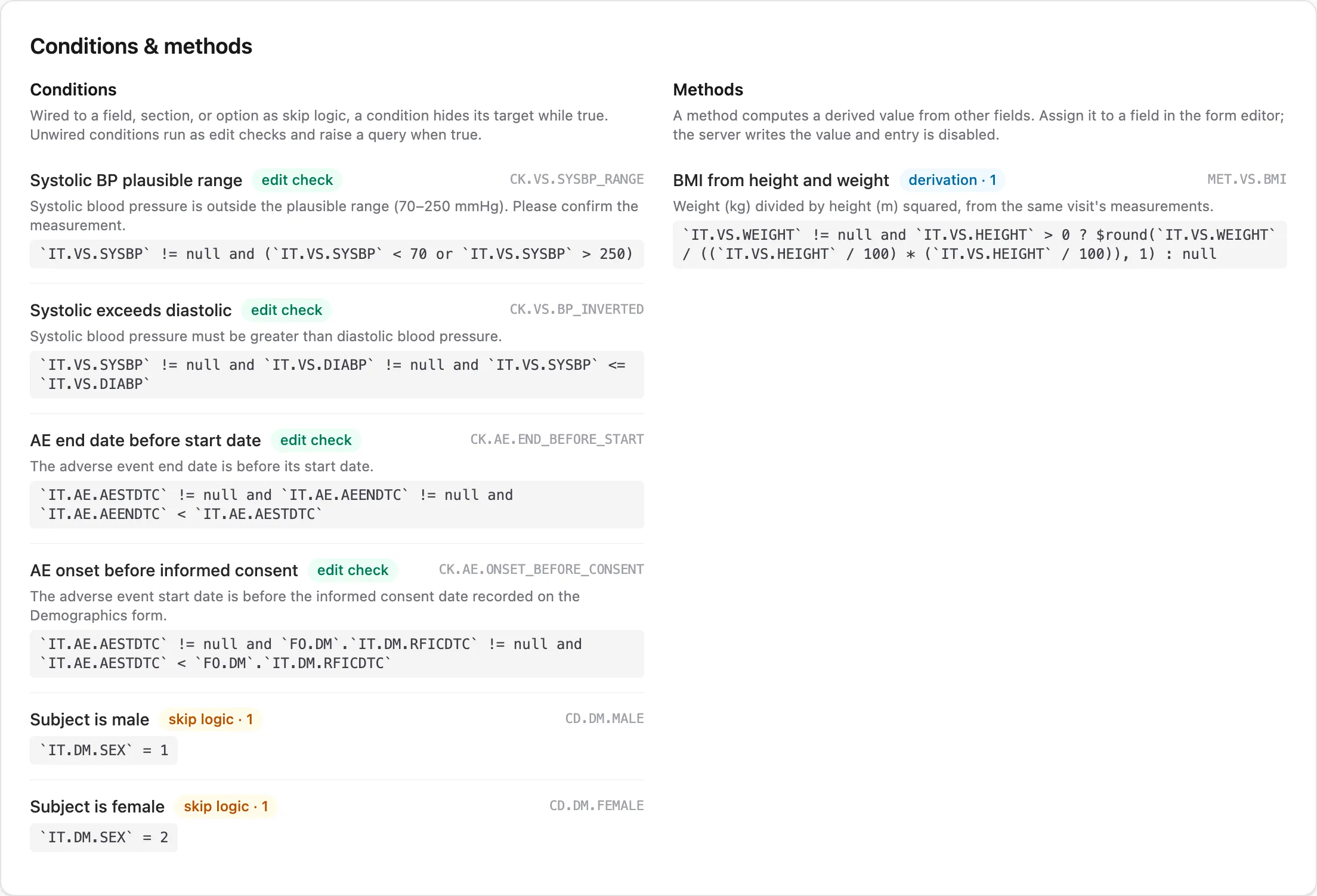
The role follows from the wiring, and the builder shows it as a badge on each rule: an unwired condition is labeled edit check, a wired one skip logic with its reference count, and every method derivation. Wiring a condition to a field changes what it does, not just where it appears: skip logic gates collection and never raises queries, while an edit check flags data and never hides anything.
JSONata in ten minutes
Section titled “JSONata in ten minutes”JSONata expressions read item values by their OIDs in backticks and combine them with ordinary operators. Everything you need for most studies fits in a few patterns, all taken from the demo study:
A range check (CK.VS.SYSBP_RANGE). True when the value is
implausible; the description becomes the query text.
`IT.VS.SYSBP` != null and (`IT.VS.SYSBP` < 70 or `IT.VS.SYSBP` > 250)A cross-field check (CK.VS.BP_INVERTED). Two fields that must agree:
`IT.VS.SYSBP` != null and `IT.VS.DIABP` != null and `IT.VS.SYSBP` <= `IT.VS.DIABP`A date-ordering check (CK.AE.END_BEFORE_START). ISO dates compare
correctly as strings:
`IT.AE.AESTDTC` != null and `IT.AE.AEENDTC` != null and `IT.AE.AEENDTC` < `IT.AE.AESTDTC`A cross-form check (CK.AE.ONSET_BEFORE_CONSENT). Qualifying an item
with another form’s OID reads that form of the same subject. The query
opens on the form the unqualified items belong to (here, the AE form), and
because the other form’s data isn’t available in the browser, these checks
run only on the server — the entry UI marks their findings checked on
save:
`IT.AE.AESTDTC` != null and `FO.DM`.`IT.DM.RFICDTC` != null and `IT.AE.AESTDTC` < `FO.DM`.`IT.DM.RFICDTC`A skip condition (CD.DM.MALE). True when the field should not be
collected. The demo study skips the pregnancy-test item while sex is
recorded male (coded value 1):
`IT.DM.SEX` = 1A derivation (MET.VS.BMI). Returns the computed value, or null when
inputs are missing (the field stays empty rather than erroring):
`IT.VS.WEIGHT` != null and `IT.VS.HEIGHT` > 0 ? $round(`IT.VS.WEIGHT` / ((`IT.VS.HEIGHT` / 100) * (`IT.VS.HEIGHT` / 100)), 1) : nullThree habits keep rules trustworthy. Guard against nulls: an untouched form has every value null, and a check that fires on empty forms buries sites in queries. Lean on the item’s data type: values are evaluated as their ODM type, so integers compare numerically and dates as ISO strings. And keep expressions pure: they read the form’s values and return a result; they cannot write or fetch. The one sanctioned way to see beyond the form is a cross-form check, covered below.
Walkthrough: author an edit check
Section titled “Walkthrough: author an edit check”As demo-admin, open the demo study, open the latest build, and click
Edit build. Scroll to Conditions & methods.
- Click + Condition. A new rule appears with a generated OID.
- Name it (say, “Pulse plausible range”) and write the description sites will read when it fires: this text is the query message.
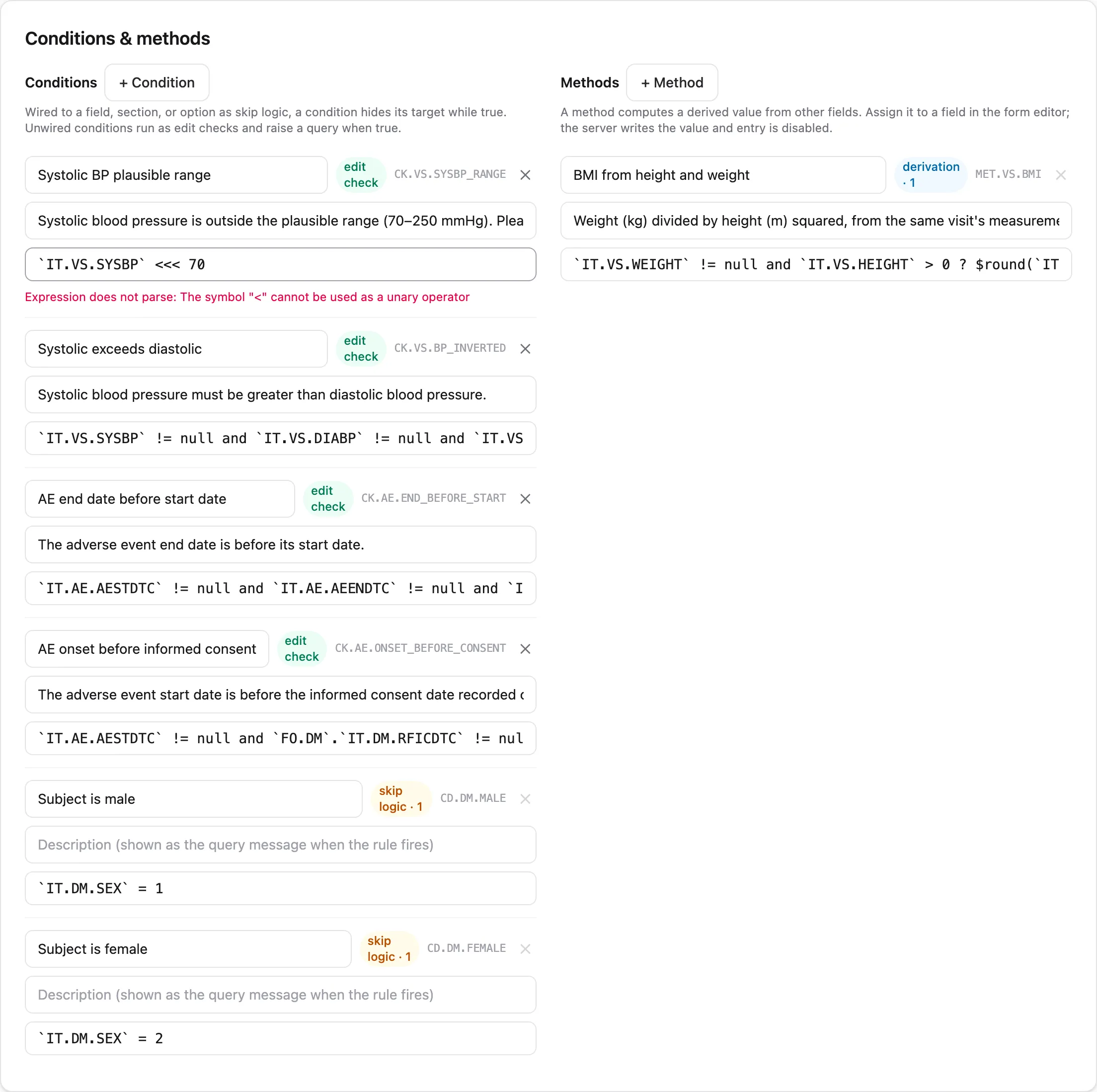
- Type the expression. The panel checks syntax as you type; a typo shows Expression does not parse with the parser’s reason, immediately and before anything is saved:
- Leave it unwired: an unreferenced condition runs as an edit check.
- Click Save as new build. The draft is validated whole and written as the next immutable build version, through the same import path as an ODM file.
Nothing you type is persisted until that save, so experimenting is free. Existing forms keep the build they were captured under; moving them to the new build is an explicit amendment migration.
Walkthrough: skip logic and dependent options
Section titled “Walkthrough: skip logic and dependent options”Skip logic is a condition plus a reference. In the demo study, the condition
CD.DM.MALE (true while sex is male) exists in the rules panel, and the
pregnancy-test item’s editor wires it as the item’s collection exception.
To do the same for any field: author the condition, then open the item in
the form editor and select it under the skip setting.
Two things follow from the wiring:
- The field disappears during entry while the condition is true, and returns when it goes false. A section whose every field is skipped hides entirely.
- A value that was already saved is never silently deleted when its field becomes skipped; it is retained, badged not collected, and queried until the site resolves it. The entry-side behavior, including the retained-value workflow, is described in Data capture.
The same mechanism, referenced from a codelist option instead of a field,
withdraws that one option while the condition is true: the demo study
removes “Not performed” from the pregnancy-test result once sex is recorded
female. In the export this uses the edc: vendor-extension attribute, so
consumers that only speak plain ODM simply see the full option list.
Walkthrough: a derived value
Section titled “Walkthrough: a derived value”Methods live in the right column of the same panel. The demo study’s
MET.VS.BMI computes BMI from height and weight:
- Click + Method, name it, and write the expression.
- Open the target item in the form editor and assign the method. The item becomes computed: entry is disabled everywhere, including lab import and RTSM intake.
- Save as a new build.
At runtime the server evaluates the method after every accepted write and
stores the result through the normal audited path, as item_value.derived,
permanently distinguishable from entered data. Sites see a live preview
with a computed badge while they type the inputs, but the stored value
is always the server’s own calculation. A derivation may read other derived
items; a circular chain is rejected when the build is validated, not
discovered at runtime.
Cross-form checks
Section titled “Cross-form checks”Everything above reads one form instance at a time. Consistency checks often need two: an adverse event’s onset against the screening visit date, a concomitant medication against the AE it treats. An edit check reads the subject’s other forms by qualifying item OIDs with the form’s OID:
`IT.AESTDT` != null and `IT.AESTDT` < `FO.DM`.`IT.VISDT`Unqualified OIDs keep their meaning, the form the check is evaluated on, so every existing check behaves exactly as before. The form holding the check’s unqualified items is its home form: the form where its queries open and where sites see the finding. This check’s home is the AE form; it fires there when an onset date precedes the Demographics visit date.
What a reference sees. A qualified form OID binds to an array of the
subject’s instances of that form, one object per instance. Each object
carries the form’s item values, typed the same way as local values, plus
three metadata keys: _event_oid, _event_repeat_key, and
_form_repeat_key. A repeating item group inside the form appears as an
array of occurrence objects, each holding _repeat_key and that
occurrence’s values. JSONata’s sequence semantics fit this shape: with a
single Demographics instance, `FO.DM`.`IT.VISDT` is simply the date,
and against a repeating form or event it is a sequence you can filter. The
metadata keys are how you pin a reference to one visit:
`IT.AESTDT` != null and `IT.AESTDT` < `FO.DM`[`_event_oid` = "SE.SCR"].`IT.VISDT`A referenced form the subject does not have yet contributes nothing: the qualified reference evaluates to nothing, comparisons against it are not true, and the check stays quiet, the same behavior as the null guards you already write locally.
When it fires. The server re-evaluates a cross-form check after every accepted write to any form its expression reads, not just the home form. Correcting the Demographics visit date re-runs the AE check and opens or auto-closes its system queries on the AE form, with the same open-and-auto-close mechanics as any edit check. One edge case: if the home form has no instance yet (the site has not opened it), there is nothing to attach a query to, so the check first fires on that form’s own first write.
During entry. Single-form rules give feedback as the site types. Cross-form checks are the exception: the browser is never sent the subject’s other forms (both payload size and blinding forbid it), so they cannot fire instantly. Their findings arrive with the save response and render with a checked on save label. Builds that use no cross-form checks are unaffected, during entry and everywhere else.
Validation at publish. Saving a build checks every qualified reference: naming an item that is not on the referenced form is an error, and a cross-form check with no unqualified local item at all is a warning: it would evaluate identically on every form, leaving no home form to attribute its query to.
Scope. Only edit checks cross forms. Skip logic and derivations stay single-form: qualified references are not honored in a collection-exception condition or a MethodDef.
How rules travel
Section titled “How rules travel”Conditions and methods are part of the build, so they export and import
with it. In the ODM XML they are ordinary ConditionDef and MethodDef
elements with JSONata formal expressions:
<ConditionDef OID="CK.VS.SYSBP_RANGE" Name="Systolic BP plausible range"> <Description> <TranslatedText xml:lang="en" Type="text/plain">Systolic blood pressure outside plausible range (70-250 mmHg)</TranslatedText> </Description> <FormalExpression Context="jsonata">...</FormalExpression></ConditionDef>That means rules can be authored in the panel, in a file, by your protocol
tooling, or by an LLM, and land in the same versioned build either way.
Round-tripping is a tested property; option-level skip references use the
edc: namespace and are ignored gracefully by other ODM consumers.
Pitfalls
Section titled “Pitfalls”- Check messages are visible to everyone who sees the form. Edit checks may reference blinded items, but the description text is shown to blinded roles too; never word a message so it reveals the value. The importer warns when a check references a blinded item.
- A wired condition never raises queries. If you want both behaviors (skip a field and query an inconsistency), author two conditions.
- Item definitions are shared. Assigning a method or skip condition to an item affects every form that references that item.
- Rules version with the build. Tightening a check mid-study is an amendment; when migrated forms re-run the new check, expect new system queries where it fires. The amendments page shows how to preview that before executing.
Where next
Section titled “Where next”- Data capture: what sites see when these rules run.
- Amendments: changing rules on a study that already has data.
- Study builds: the build model these rules live in.