Analytics workbench
Most EDC systems make operational reporting a vendor-locked afterthought. edc-core gives data managers real SQL, R, and Python, inside the EDC, against versioned, analysis-ready study datasets.
Snapshots
Section titled “Snapshots”Capture happens in PostgreSQL; analysis happens on snapshots published into a per-study DuckLake lake (Parquet files, with the same Postgres serving as catalog; no extra server).
Publishing a snapshot pivots the live, append-only capture data into typed
tables at the CDISC dataset grain: one table per ODM item group (ig_vs,
ig_ae, …) with columns typed from the item definitions, plus subjects and
queries. Each snapshot is pinned to a lake version: an immutable,
point-in-time dataset. Interim analyses and database locks reference a
snapshot ID and are reproducible indefinitely, even as capture continues.
Pick a snapshot, browse its tables and columns in the schema panel, and query with DuckDB SQL:
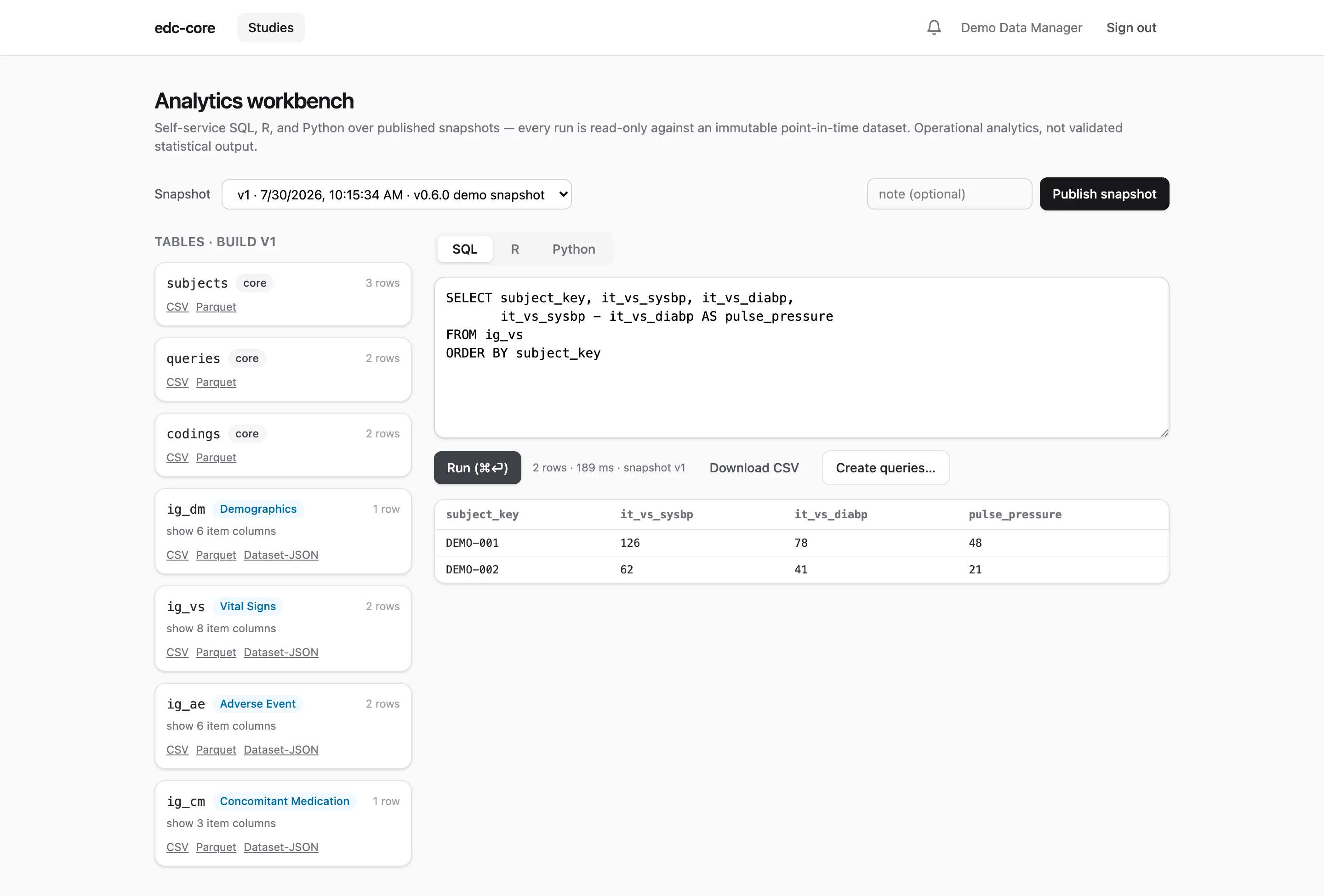
Every run executes in a locked-down, read-only session that can only see the selected study’s snapshot (isolation is physical, at attach time, not a convention). Results are capped at 5,000 rows with a 30-second timeout, are downloadable as CSV, and every execution is audited with its SQL text.
R and Python
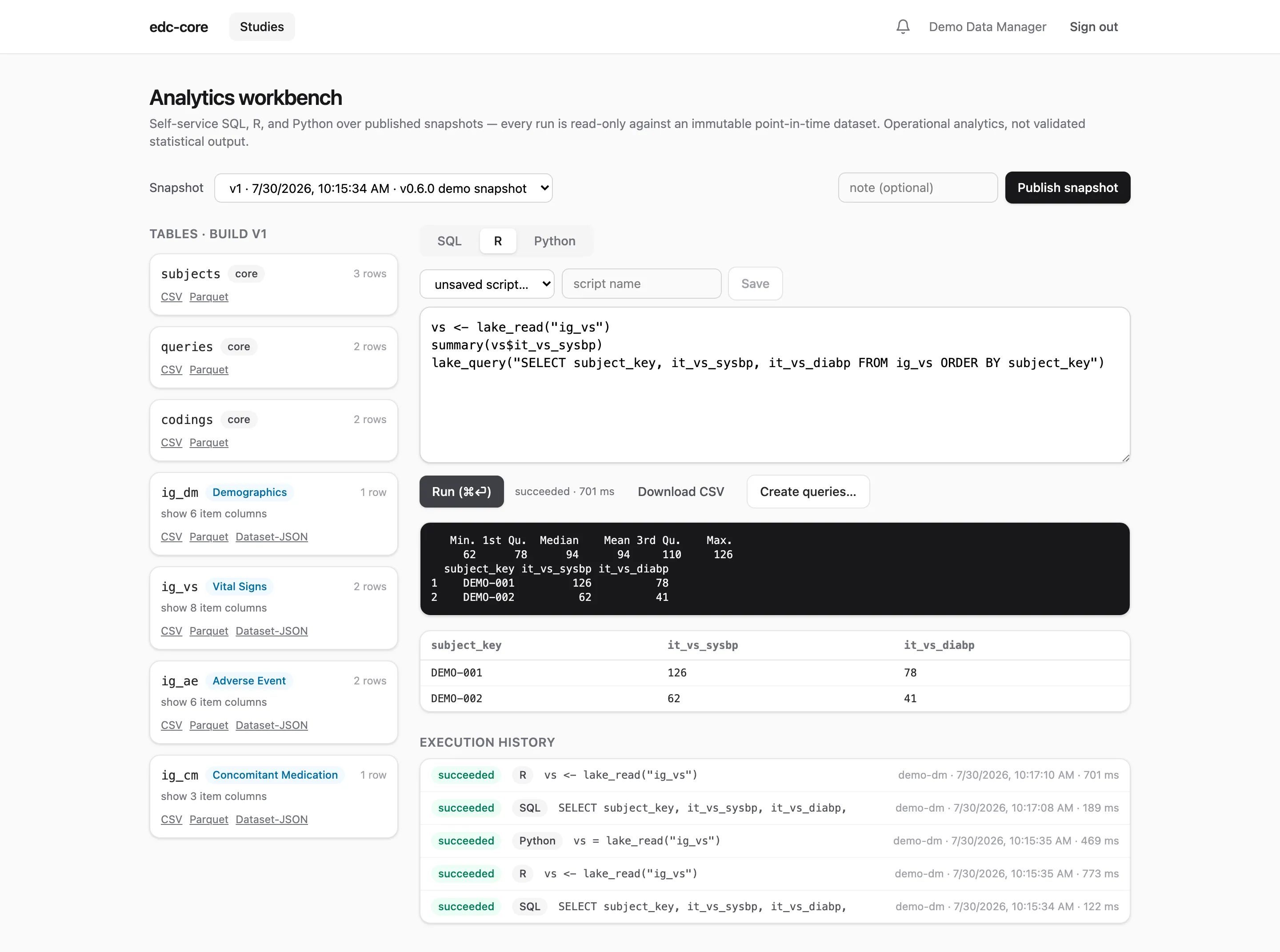
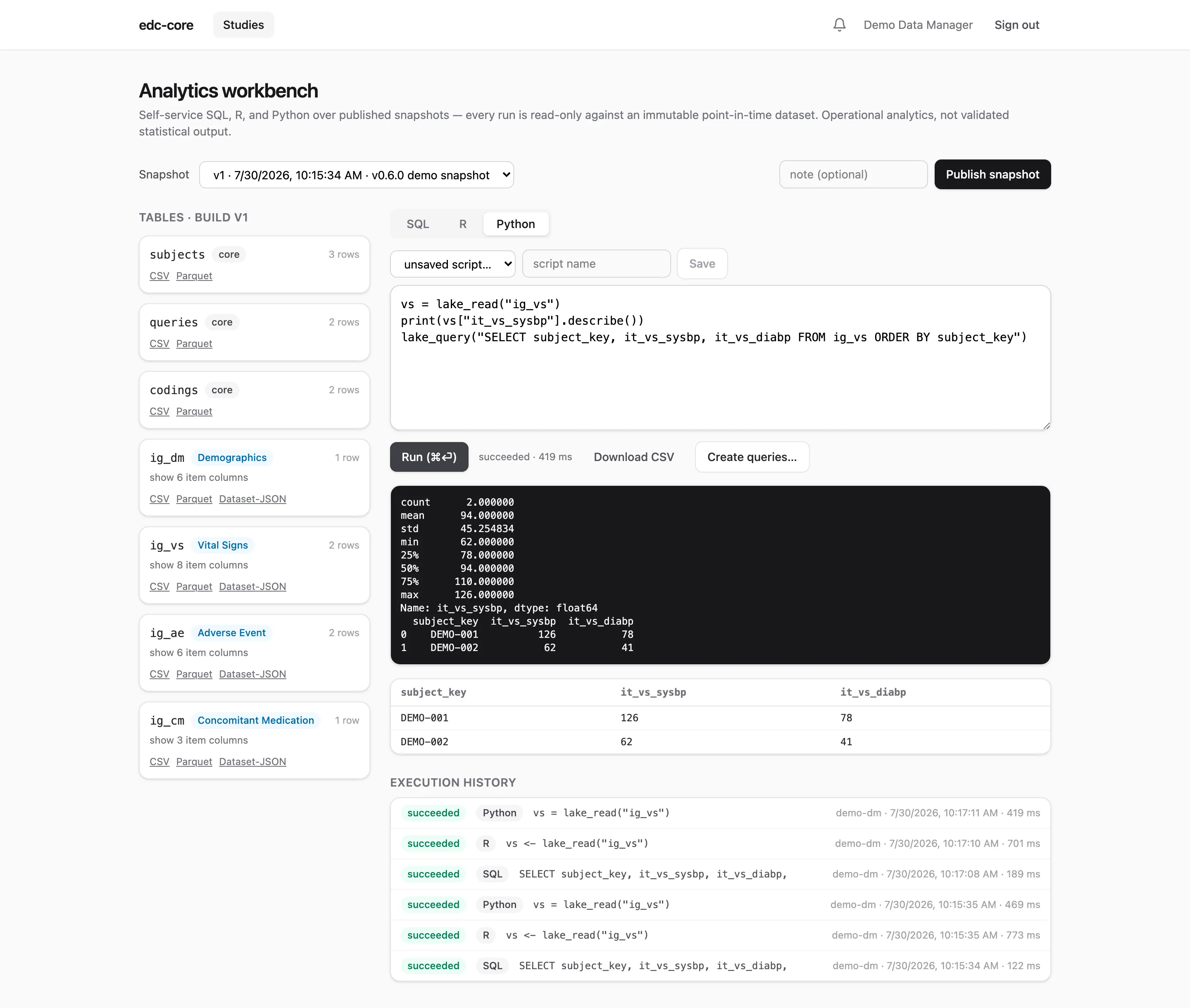
Section titled “R and Python”The R and Python tabs send scripts to sandboxed server-side containers (R: Rocker + plumber; Python: duckdb + pandas). Each run executes in a fresh subprocess against the same pinned snapshot, with two helpers in scope:
vs <- lake_read("ig_vs") # a table as a data.framelake_query("SELECT ...") # arbitrary DuckDB SQL, as a data.framevs = lake_read("ig_vs") # a table as a pandas DataFramelake_query("SELECT ...") # arbitrary DuckDB SQL, as a DataFrameConsole output, the last data-frame result, and timing come back to the browser; scripts can be saved and versioned per study, and the execution history (code, logs, outputs, who and when) is retained and audited. This directly serves ICH E6(R3)‘s expectation of traceable data transformations.
From listings to queries
Section titled “From listings to queries”A cleaning listing that finds problems is half the job; the other half is
getting each finding in front of the site. Traditionally that means
re-keying every flagged row into the query system by hand. Here the listing
result is the input: after any run with result rows (SQL, R, or Python
alike), users who also hold the query.manage permission see a
Create queries… button beside the results.
The button opens a dialog that maps result columns onto query targets:
- Key columns map themselves. Columns named after the lake’s key
columns (
subject_key,event_oid,event_repeat_key,form_oid,form_repeat_key,item_group_repeat_key) are picked up automatically, so a listing that keeps those names in itsSELECTneeds no manual mapping. Subject and form are required; the others narrow the target to a specific visit or repeat. - An optional item column targets each query at a field instead of the form. The choices come from the snapshot’s own manifest (the dialog knows which result columns are item columns and which item they carry), and the listed value travels along for staleness detection, below.
- One message for the whole batch. This text is what sites read, so write it as you would any manual query.
Preview first. The preview runs the identical server-side resolution as creation, with zero writes, and reports a per-row outcome. It is not an estimate: a row that previews as would create creates, and a skipped row shows exactly why it will skip:
| Skip reason | Meaning |
|---|---|
subject_not_found, event_not_found, form_not_found | The target does not resolve in live capture (a key column is mismapped, or the data moved since the snapshot). |
ambiguous_target | More than one form instance matches; map an event column to pin the row to one visit. |
unknown_item | The item is not on that form under the instance’s pinned build. |
duplicate_open_query | The target already has an open or answered query, of any origin; the problem is already being worked. |
value_changed | Live capture no longer matches the listed value: the site corrected it after the snapshot, so the query would be about stale evidence. |
site_forbidden | query.manage is checked per target’s site, so a site-scoped reviewer gets skips for other sites’ rows rather than a failed batch. |
form_locked | Locked forms take no new queries. |
Snapshot evidence, live targets. The sandbox boundary does not move for
this feature: engines still read only snapshots. What changes is that the
API re-resolves every proposed row against live capture before any query is
written (POST /studies/:id/queries/batch, up to 500 targets per call,
with dryRun for preview). The snapshot is the evidence; the live study is
the target. Rows where the two disagree are skipped and reported, never
silently queried. The endpoint also accepts force, which waives only the
value_changed skip for the rare case where the query is warranted even
though the value moved.
What comes out is ordinary queries. Created queries enter the normal
query lifecycle: same threads, same dashboard, same
site workflow. What they add is provenance: each records the workbench
execution it came from, and its query.opened audit event carries the
batch, execution, snapshot, lake version, and the script and script version
if the run was a saved script. An auditor can walk from a site’s answer all
the way back to the exact code and dataset that raised the question. Sites
are notified once per batch per site (“12 new queries from data review”),
not once per query.
Exports and the study archive
Section titled “Exports and the study archive”Any snapshot table exports as Dataset-JSON v1.1 (the FDA-accepted, CDISC-standard exchange format), CSV, or Parquet, straight from the table cards above the editor. Every subject also has a PDF casebook, and the study archive bundles the whole study (every build’s ODM, all datasets, the audit trail, signatures, casebooks) into one self-contained zip. When to use which format, what a casebook contains, and what the archive is for are covered on Exports, casebooks, and the study archive.
Permissions
Section titled “Permissions”The workbench is gated by the analytics.run permission (data managers,
monitors, and admins by default); snapshot publication, exports, and archives
by export.data. Creating queries from listings
additionally requires query.manage, checked per target’s site: raising
work for sites is a query permission, not an analytics one. Like everything
else, grants are per-study and auditable.