Blinding
In a blinded trial, some values (most often the treatment arm) must be invisible to some people while staying real, versioned, audited data. In edc-core, blinding is a flag on the item definition, enforced everywhere the value could appear, and governed by one permission. This page walks what each role sees, where the mask follows the data, and how breaking the blind is documented. The design rationale is ADR-0009.
Who does what: blinding is authored with study.manage; seeing
blinded values requires the data.unblind permission, held by default by
the site-facing roles (investigator, data entry, admin) and not by
monitors or data managers. The screenshots use the seeded
ST.BLD.DEMO study: a dosing form whose assigned-arm item is blinded,
entered by demo-coord, reviewed by demo-cra (monitor), with
demo-inv performing the break-the-blind action.
The model in one paragraph
Section titled “The model in one paragraph”An item flagged Blinded (the checkbox in the builder’s item editor, or
edc:Blinded="Yes" in the ODM file) is captured, versioned, and audited
exactly like any other item: blinding scopes visibility, not
collection. At read time, the server checks whether the requester holds
data.unblind in scope and masks the value if not. At snapshot publish,
blinded columns are excluded structurally, so downstream surfaces cannot
leak what they never contain.
What each role sees
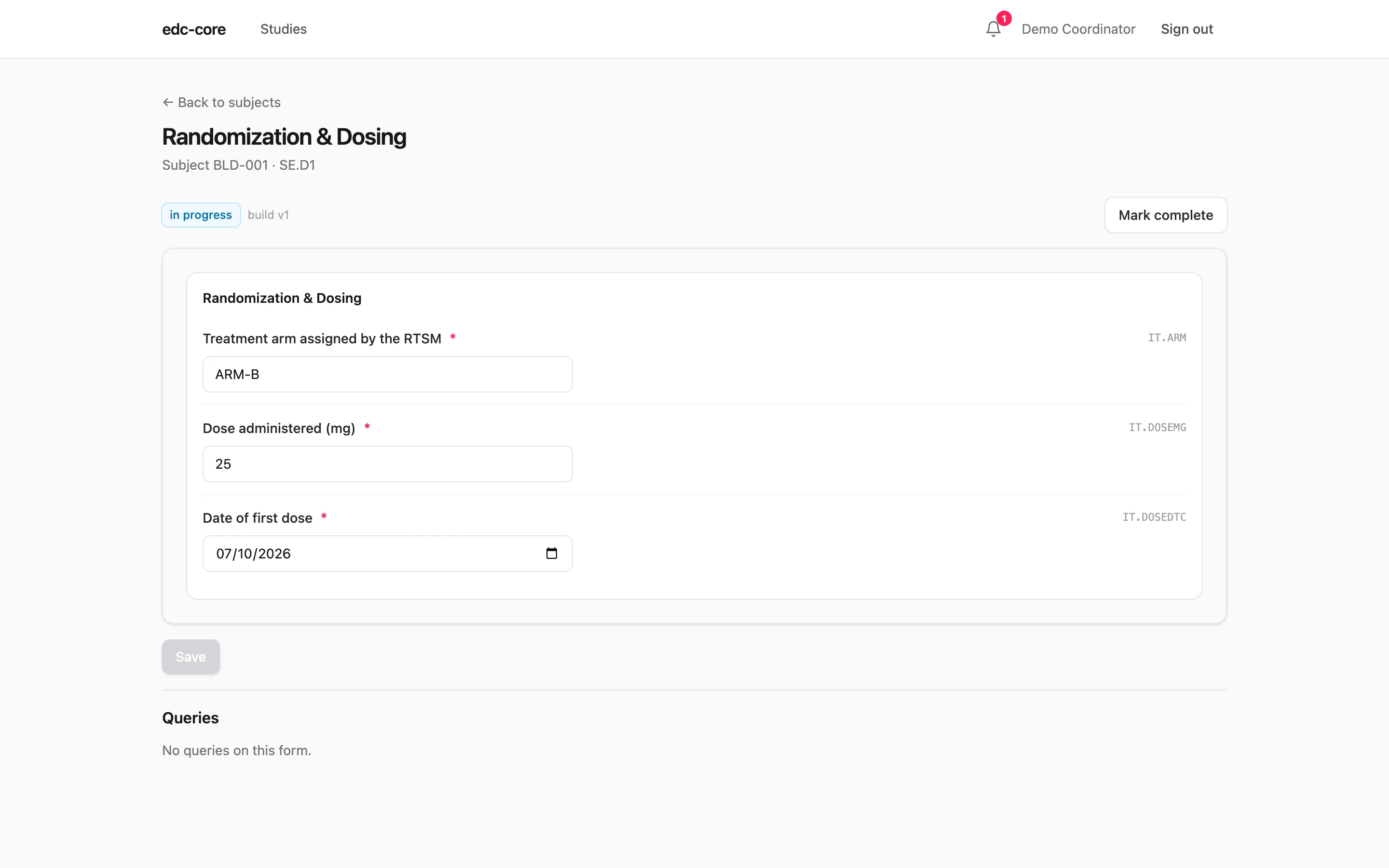
Section titled “What each role sees”The demo study’s Day 1 form collects the RTSM-assigned arm (blinded) and
the administered dose. The site coordinator, holding data.unblind as an
entry role, sees a normal form; entering a dose next to a visible arm
feels like entering anything else:
The monitor opens the same form and sees the item’s presence and entry status, but never its value:
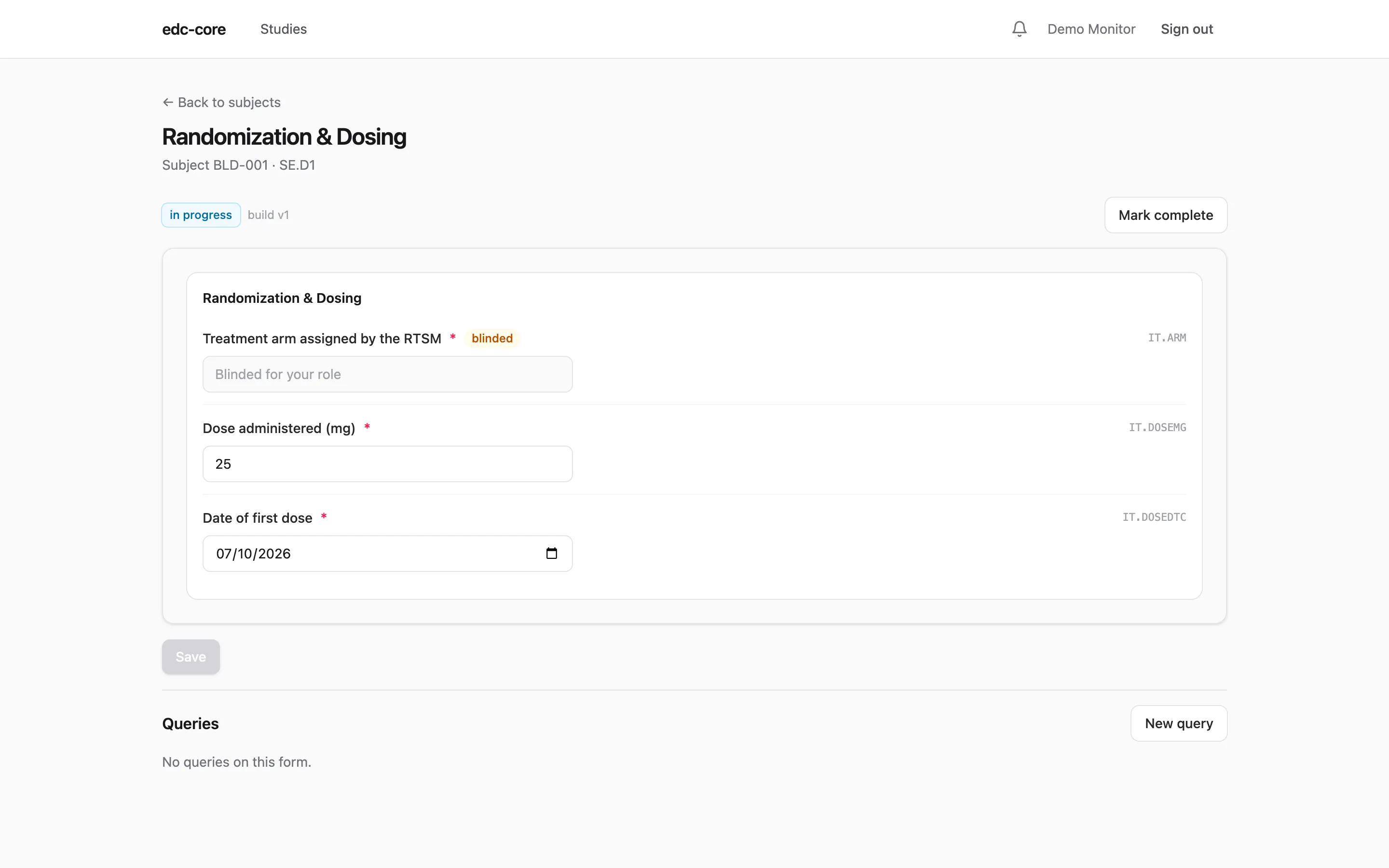
That is the whole user-facing contract: the blinded reviewer can still verify the form was filled, query it, and see that the arm changed in the audit trail, without ever learning what it says.
Everywhere the mask follows
Section titled “Everywhere the mask follows”The same rule applies wherever the value could travel:
- Casebooks print
[BLINDED]unless the requester can unblind; study archives always use the blinded rendering. - Audit review shows blinded reviewers who changed the item, when, and why, with old and new values masked.
- Analytics snapshots never contain blinded columns at all, so the SQL, R, and Python workbench and every export are blinded by construction; the snapshot manifest lists the excluded items.
- The RTSM transfer log masks the arm and strata for viewers without a
study-wide
data.unblindgrant.
Authoring blinded items
Section titled “Authoring blinded items”In the builder, tick Blinded on the item; in an ODM file, set
edc:Blinded="Yes" on the ItemDef. Two authoring rules interact with
other features:
- Arm assignments from an RTSM should land on a blinded item. The RTSM integration writes through a service account whose unblind grant is write-only in practice, so the arm is masked everywhere from the moment it arrives.
- Blinded items are never codable, and edit checks that reference blinded items must not reveal the value in their message text; the build importer warns about both. See Rules and derivations.
Breaking the blind
Section titled “Breaking the blind”Emergencies happen, and ICH E6(R3) expects each unblinding event to be documented. In edc-core that is a first-class action on the subject matrix: Break the blind… on the subject’s status menu, taking a category (planned, or unplanned: emergency, inadvertent, other) and a required reason.
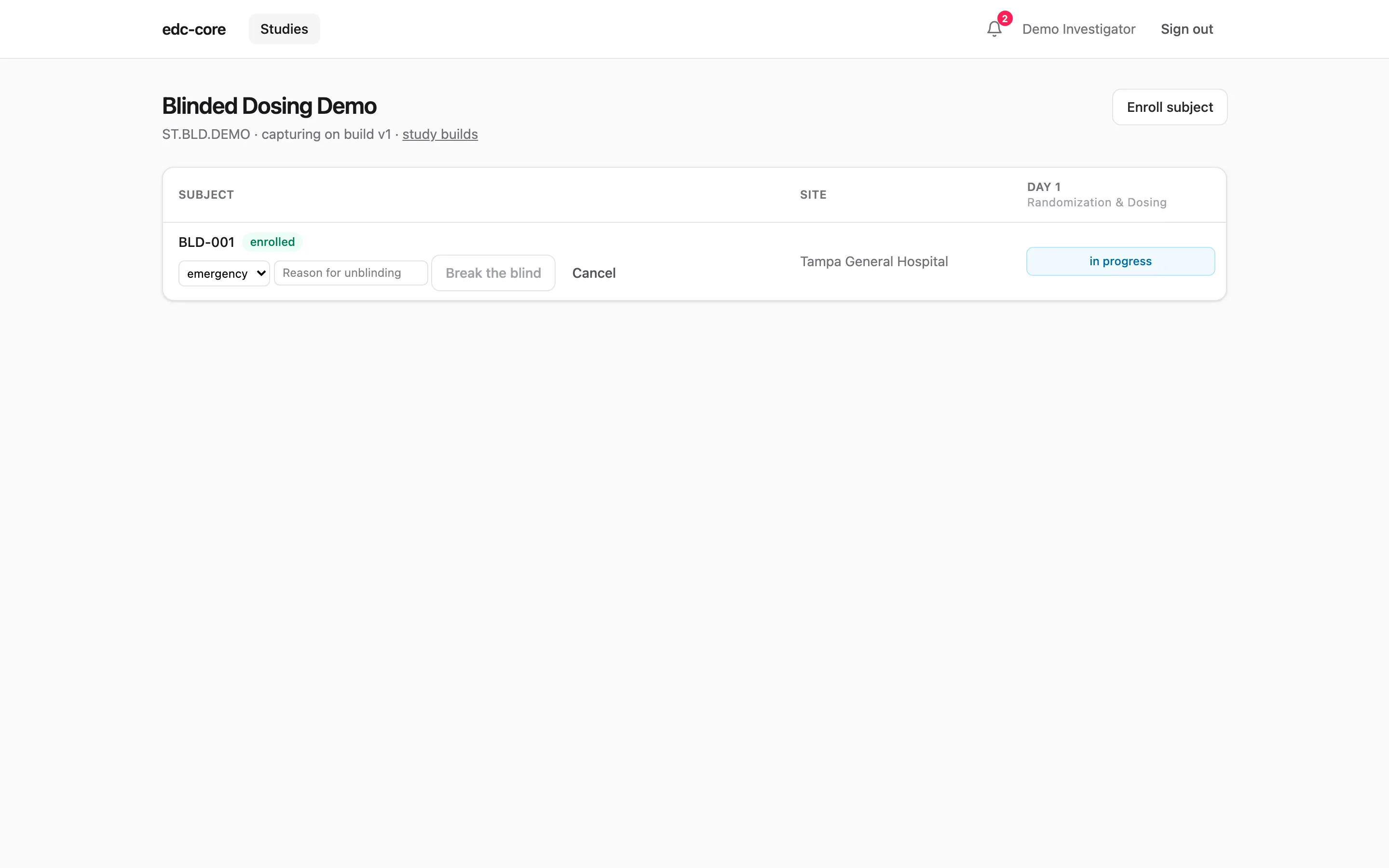
The action writes an append-only subject.unblinded audit event and marks
the subject with an unblinded badge, and the event prints in the
subject’s casebook. Two boundaries are deliberate:
- Breaking the blind is documentation, not a switch. Masking stays
governed by
data.unblindgrants; one subject’s emergency unblinding must not unmask them for every viewer. Who needed to see the value gains the grant through the team page, auditable like any grant. - Emergency code-break workflows stay in the RTSM, which holds the randomization list. edc-core records that an unblinding happened and why.
Governance
Section titled “Governance”Access to blinded data is a grant, not a setting. The
team page shows who holds data.unblind,
at what scope, granted when and by whom; revoking it takes effect
immediately. System administrators deliberately have no bypass: without a
study role carrying the permission, an administrator sees [BLINDED]
like any other viewer. For E6(R3) §4.1 purposes, the grant history is the
record of who could see unblinded data and when, and the break-the-blind
events are the record of each unblinding; assessing an unplanned
unblinding’s impact on trial results remains your organization’s call.
Where next
Section titled “Where next”- RTSM integration: how the arm arrives without a human ever typing it.
- Data capture: the entry-side summary.
- User administration: granting and revoking
data.unblind.